
CNN with Keras: Beginner Guide to Convolutional Neural Networks for Image Classification
A Convolutional Neural Network, or CNN, is one of the most important deep learning architectures for image-related tasks. CNNs are widely used for image classification, object detection, segmentation, face recognition, medical imaging, satellite image analysis, and many other computer vision problems.
In this blog, we will learn the basics of CNN with Keras. Keras makes it easy to build neural networks layer by layer without writing every mathematical operation from scratch.
I originally wrote this notebook in 2019 when I was learning CNNs. I have now rewritten it as a cleaner beginner-friendly tutorial with modern Keras-style code and better explanations.
Note: Some images used in the original version of this post were collected from the internet while I was learning. Full credit belongs to the original image authors.
What This Tutorial Covers
In this tutorial, we will cover:
- why Keras is useful
- what a CNN is
- why CNNs work well for images
- basic CNN terms
- convolution layers
- filters and kernels
- stride and padding
- feature maps
- max pooling
- dropout
- flatten and dense layers
- a simple CNN architecture
- loading image data with Keras
- data augmentation
- compiling and training a CNN
- overfitting and how to reduce it
- common beginner mistakes
Why Keras?
Keras is a high-level deep learning API. It lets us build neural networks by stacking layers together.
Keras is beginner-friendly because:
- it is easy to read
- it is easy to build models quickly
- it hides many low-level details
- it supports common deep learning layers
- it has tools for preprocessing images
- it works well with TensorFlow
- it supports fast experimentation
In older code, we often wrote imports like this:
from keras.models import Sequential
from keras.layers import Conv2D, MaxPooling2D, Flatten, Dense, Dropout
In modern TensorFlow projects, you will often see:
import tensorflow as tf

from tensorflow import keras
from tensorflow.keras import layers
Both styles may work depending on your environment, but the TensorFlow Keras style is common in many tutorials.
Install TensorFlow and Keras
If TensorFlow is not installed, you can install it with:
pip install tensorflow
Then import it:
import tensorflow as tf

from tensorflow import keras
from tensorflow.keras import layers

print(tf.__version__)
If you are using standalone Keras 3, you may also see:
pip install keras
For beginners, using TensorFlow with Keras is usually the easiest starting point.
What Is a CNN?
A Convolutional Neural Network is a neural network that uses convolution operations to learn patterns from data.
CNNs are mostly used for images, but they can also be used for other structured data such as time series, audio, and text.
In simple words:
A CNN learns small visual patterns first, then combines them into larger and more meaningful patterns.
For example, in an image classifier:
- early layers may learn edges and corners
- middle layers may learn textures and shapes
- deeper layers may learn object parts
- final layers classify the image
Why CNNs Are Useful for Images
A normal fully connected neural network treats every pixel as a separate input. For images, this can create too many parameters.
CNNs are better for images because:
- they use small filters instead of connecting every pixel to every neuron
- the same filter is reused across the whole image
- they preserve spatial structure
- they can learn local patterns such as edges and textures
- they reduce the number of trainable parameters
- they work well with image data
This is why CNNs are commonly used in computer vision.
Basic CNN Terms
Before building a CNN with Keras, we need to understand some basic terms.
Image Channels
A grayscale image has one channel.
An RGB image has three channels:
- Red
- Green
- Blue
For example, an RGB image of size 224 x 224 has shape:
(224, 224, 3)
Filter or Kernel
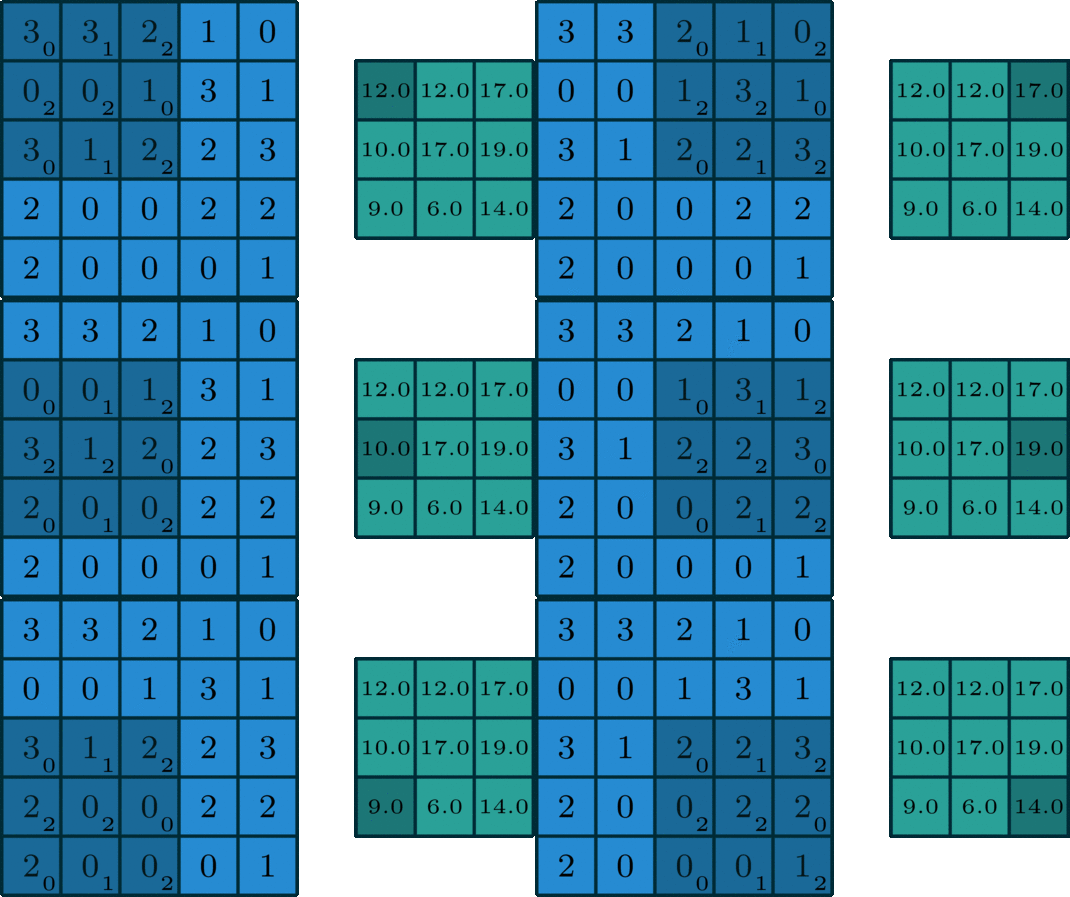
A filter is a small matrix that slides over an image. It is used to detect patterns.
For example, a 3 x 3 filter looks at a small region of the image at a time.
Feature Map
When a filter is applied to an image, it produces a new output called a feature map.
Each filter creates one feature map.
Stride
Stride controls how many pixels the filter moves at a time.
- stride
1means the filter moves one pixel at a time - stride
2means the filter moves two pixels at a time
Larger stride reduces the output size.
Padding
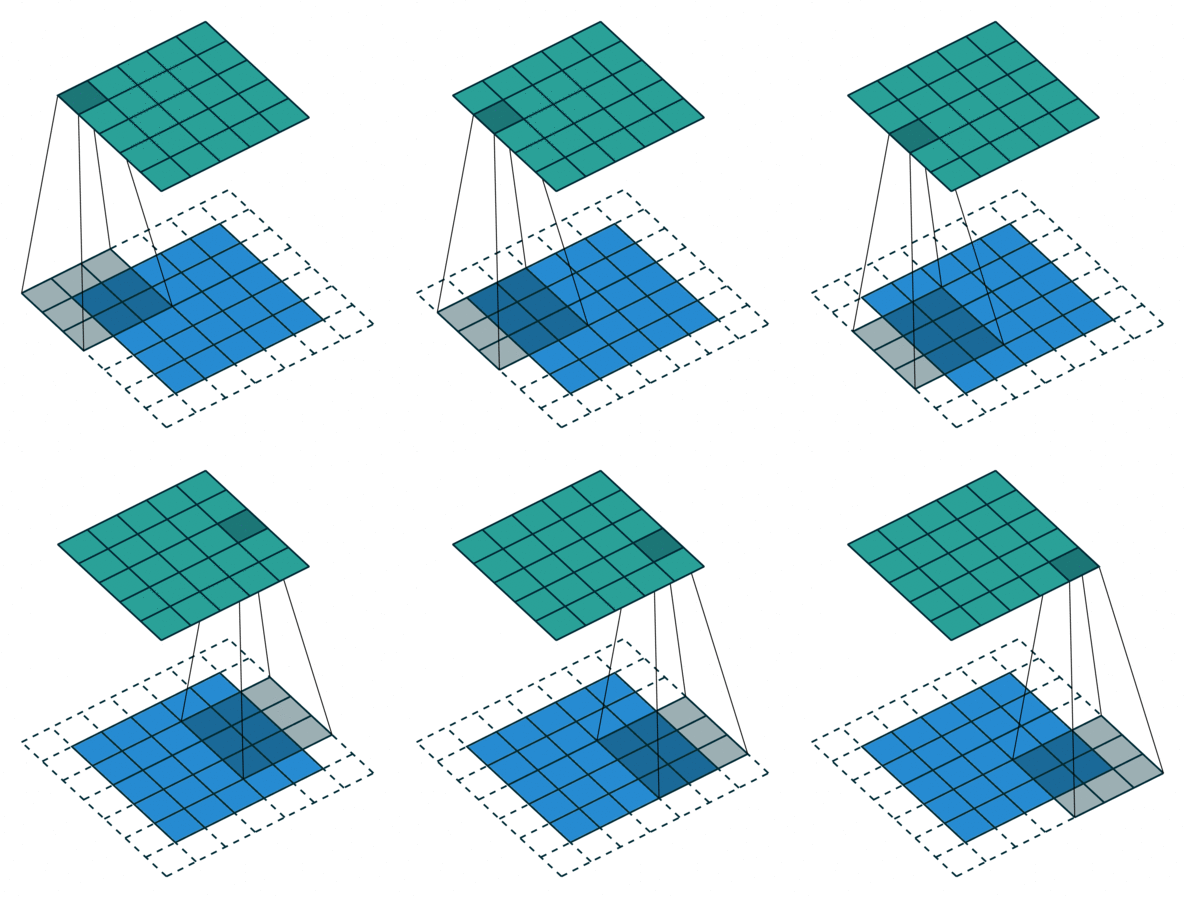
Padding means adding extra pixels around the border of an image.
Padding helps control the output size and allows filters to work better near image edges.
Common padding types are:
valid: no paddingsame: output size is kept similar to input size
CNN Visualization
Here is a simple visualization of a CNN idea:
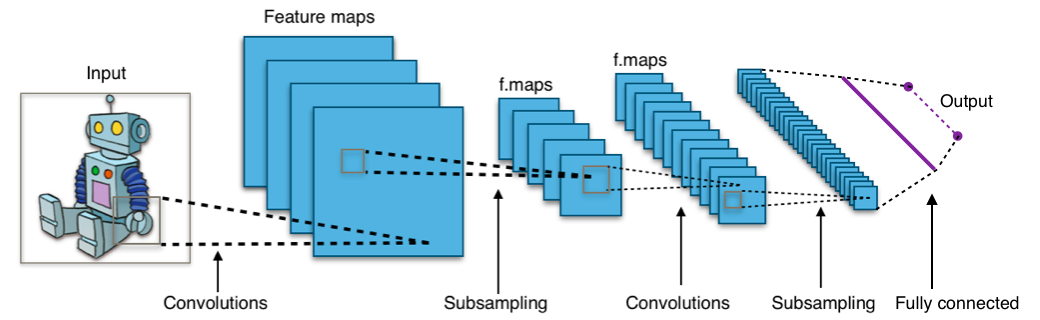
CNN layers manipulate images using kernels and learn useful patterns from them.

What Happens Inside a Convolution Layer?
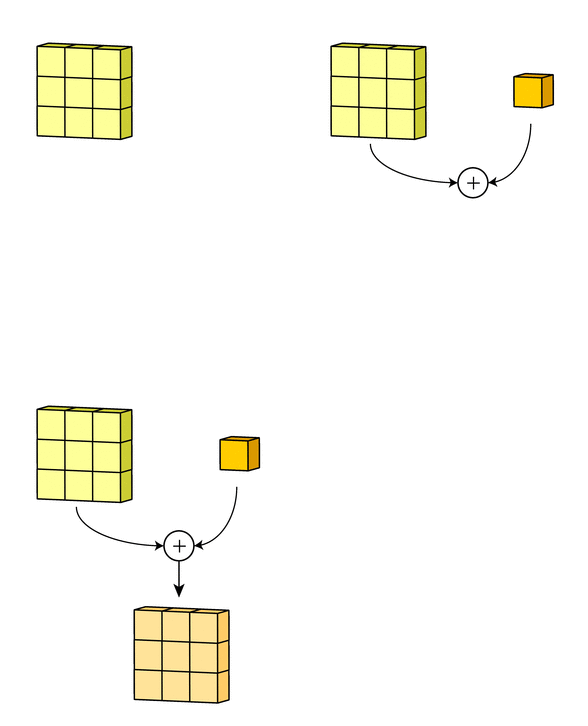
A convolution layer applies filters over an image. Each filter slides over the image and performs element-wise multiplication and summation.
For a grayscale image, convolution can be visualized like this:
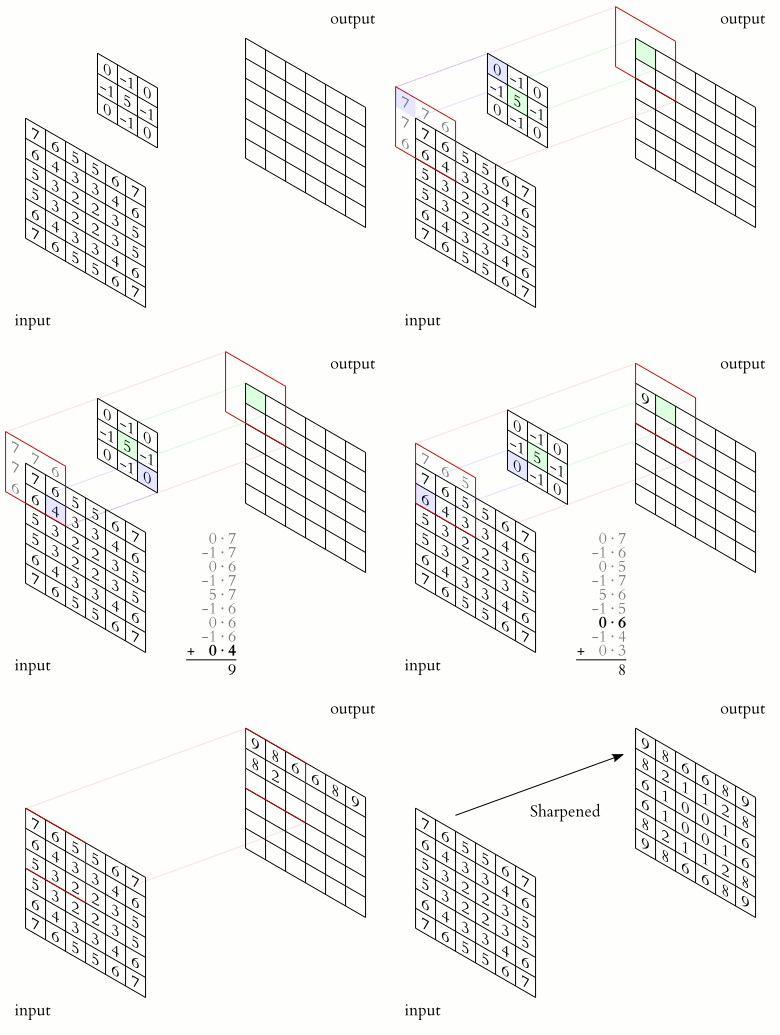
For an RGB image, the convolution happens across multiple channels.
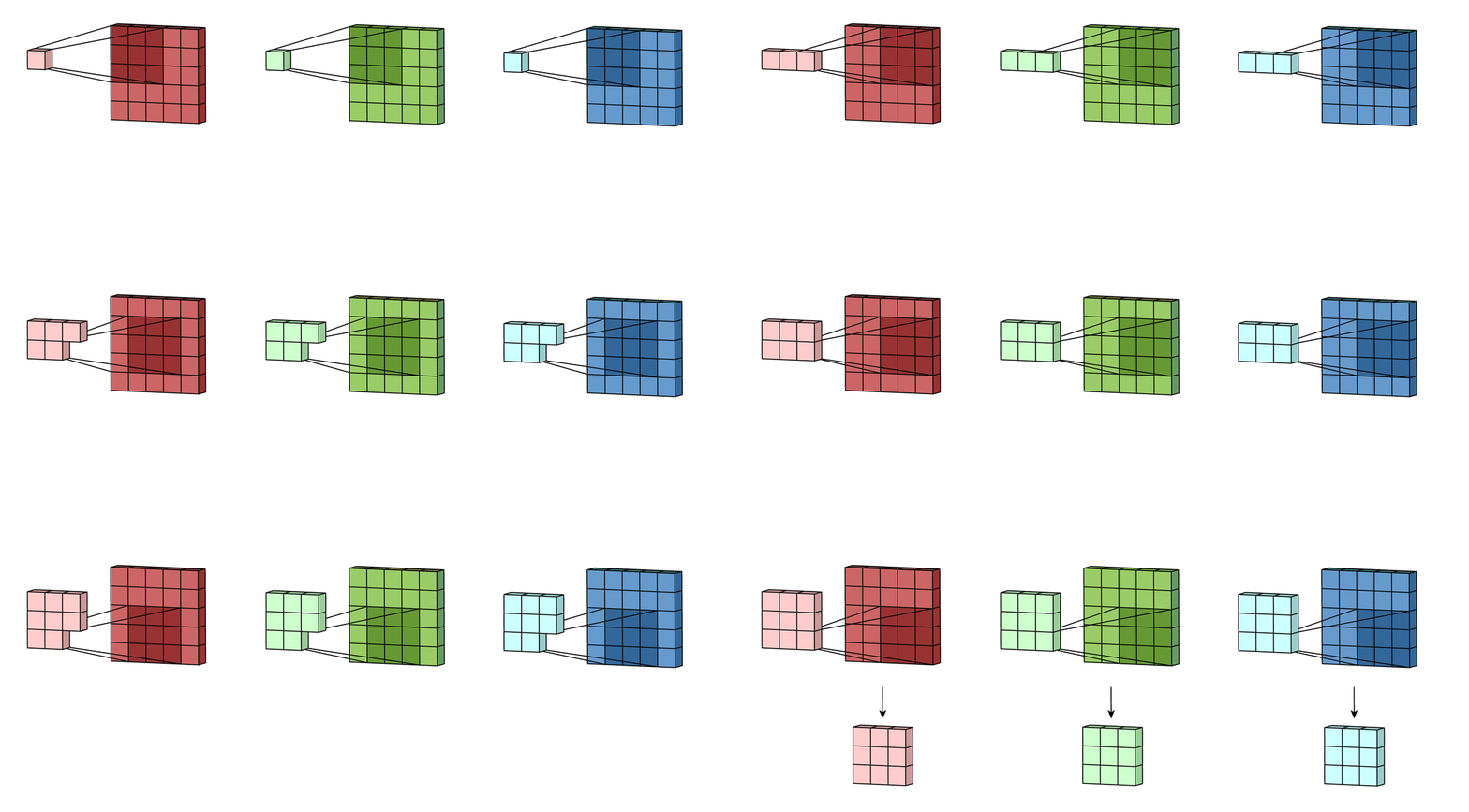
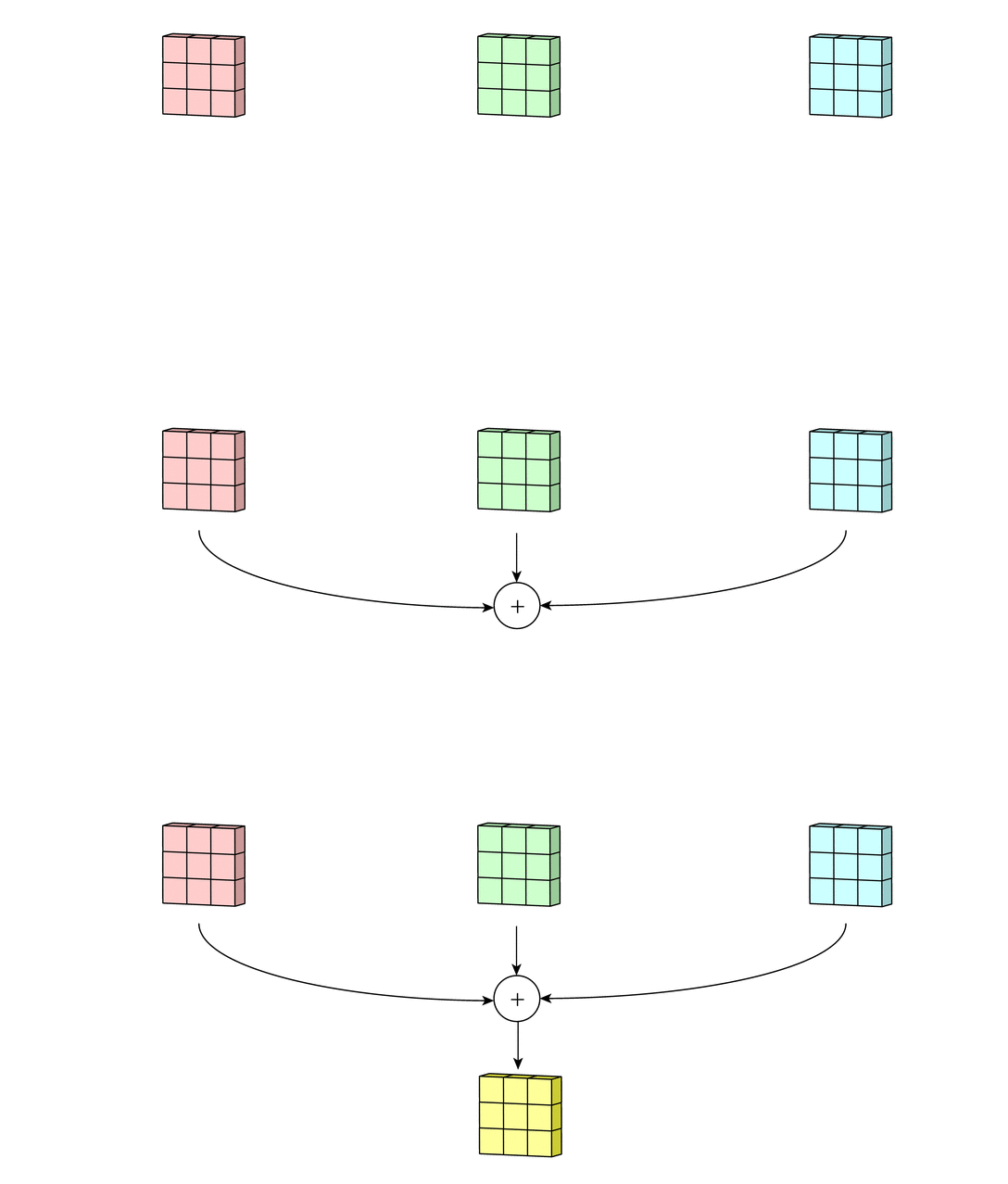
Padding adds extra pixels around the image border.
Common Layers in a CNN
A normal CNN often includes:
- input layer
- convolutional layers
- activation functions
- pooling layers
- dropout layers
- flatten layer
- dense layers
- output layer
Let’s understand each one.
Convolutional Layer
The convolutional layer is the main layer in a CNN.
In Keras, we usually use Conv2D.
layers.Conv2D(
    filters=32,
    kernel_size=(3, 3),
    activation="relu",
    padding="same"
)
Important arguments are:
filters: number of filters to learnkernel_size: size of the filteractivation: activation functionpadding: how borders are handledstrides: how far the filter moves
Example:
layers.Conv2D(32, (3, 3), activation="relu", padding="same")
This creates 32 filters of size 3 x 3.
ReLU Activation
CNNs commonly use the ReLU activation function.
activation="relu"
ReLU stands for Rectified Linear Unit. It keeps positive values and converts negative values to zero.
It helps the network learn non-linear patterns.
Max Pooling Layer
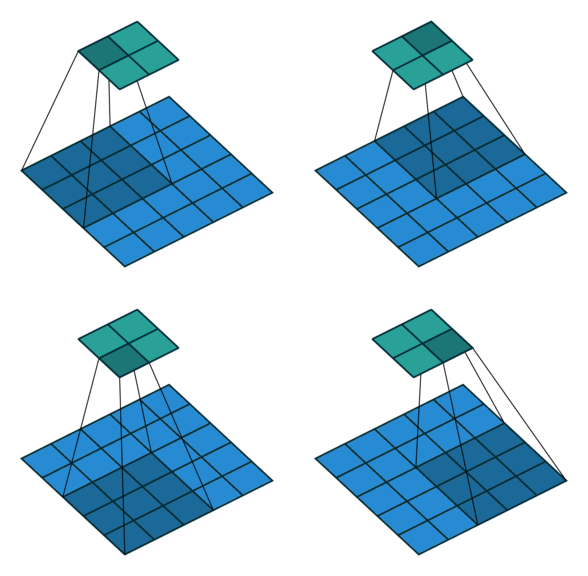
The MaxPooling2D layer reduces the spatial size of feature maps.
It keeps the maximum value from a small window.
For example, a 2 x 2 max pooling operation reduces the height and width by half.
In Keras:
layers.MaxPooling2D(pool_size=(2, 2))
Max pooling helps:
- reduce computation
- reduce feature map size
- make features more robust
- control overfitting
Dropout Layer
Dropout is used to reduce overfitting.
During training, dropout randomly sets some input units to zero. This prevents the model from depending too much on specific neurons.
layers.Dropout(0.5)
A dropout value of 0.5 means 50 percent of the units are randomly dropped during training.
Dropout is active during training, not during normal prediction.
Flatten Layer
A convolution layer outputs a 3D feature map.
Dense layers need a 1D vector.
The Flatten layer converts the feature map into a one-dimensional vector.
layers.Flatten()
For example:
(7, 7, 64) -> 3136
Dense Layer
A dense layer is a fully connected layer.
In CNNs, dense layers are usually used near the end for classification.
layers.Dense(128, activation="relu")
For binary classification, the output layer can be:
layers.Dense(1, activation="sigmoid")
For multi-class classification, the output layer can be:
layers.Dense(num_classes, activation="softmax")
A Simple CNN with Keras
Here is a simple CNN model for image classification.
import tensorflow as tf

from tensorflow import keras
from tensorflow.keras import layers


num_classes = 2
image_size = (224, 224)

model = keras.Sequential([
    layers.Input(shape=(image_size[0], image_size[1], 3)),

    layers.Rescaling(1.0 / 255),

    layers.Conv2D(32, (3, 3), activation="relu", padding="same"),
    layers.MaxPooling2D((2, 2)),

    layers.Conv2D(64, (3, 3), activation="relu", padding="same"),
    layers.MaxPooling2D((2, 2)),

    layers.Conv2D(128, (3, 3), activation="relu", padding="same"),
    layers.MaxPooling2D((2, 2)),

    layers.Flatten(),

    layers.Dense(128, activation="relu"),
    layers.Dropout(0.5),

    layers.Dense(num_classes, activation="softmax")
])

model.summary()
This model has:
- input layer
- rescaling layer
- three convolution blocks
- flatten layer
- dense layer
- dropout layer
- output layer
Compile the CNN Model
Before training, we compile the model.
model.compile(
    optimizer="adam",
    loss="sparse_categorical_crossentropy",
    metrics=["accuracy"]
)
Here:
optimizer="adam"controls how the model updates weightsloss="sparse_categorical_crossentropy"is used for integer class labelsmetrics=["accuracy"]tracks classification accuracy
For binary classification with one output neuron and sigmoid activation, you can use:
model.compile(
    optimizer="adam",
    loss="binary_crossentropy",
    metrics=["accuracy"]
)
Loading Image Data with Keras
Keras can load image data directly from folders using image_dataset_from_directory.
A common folder structure is:
dataset/
    train/
        cats/
        dogs/
    validation/
        cats/
        dogs/
Load training data:
train_ds = keras.utils.image_dataset_from_directory(
    "dataset/train",
    image_size=(224, 224),
    batch_size=32
)
Load validation data:
val_ds = keras.utils.image_dataset_from_directory(
    "dataset/validation",
    image_size=(224, 224),
    batch_size=32
)
Keras automatically uses the folder names as labels.
Improve Dataset Performance
We can improve data loading performance using caching and prefetching.
AUTOTUNE = tf.data.AUTOTUNE

train_ds = train_ds.cache().shuffle(1000).prefetch(buffer_size=AUTOTUNE)
val_ds = val_ds.cache().prefetch(buffer_size=AUTOTUNE)
This helps the GPU or CPU receive data faster during training.
Data Augmentation
Data augmentation creates random variations of images during training.
It can help reduce overfitting.
data_augmentation = keras.Sequential([
    layers.RandomFlip("horizontal"),
    layers.RandomRotation(0.1),
    layers.RandomZoom(0.1),
])
Add it to the model:
model = keras.Sequential([
    layers.Input(shape=(224, 224, 3)),
    data_augmentation,
    layers.Rescaling(1.0 / 255),

    layers.Conv2D(32, (3, 3), activation="relu", padding="same"),
    layers.MaxPooling2D((2, 2)),

    layers.Conv2D(64, (3, 3), activation="relu", padding="same"),
    layers.MaxPooling2D((2, 2)),

    layers.Conv2D(128, (3, 3), activation="relu", padding="same"),
    layers.MaxPooling2D((2, 2)),

    layers.Flatten(),

    layers.Dense(128, activation="relu"),
    layers.Dropout(0.5),

    layers.Dense(num_classes, activation="softmax")
])
Common augmentation methods include:
- random flip
- random rotation
- random zoom
- random contrast
- random translation
Train the CNN Model
history = model.fit(
    train_ds,
    validation_data=val_ds,
    epochs=10
)
During training, Keras shows metrics such as:
- training loss
- training accuracy
- validation loss
- validation accuracy
Plot Training History
import matplotlib.pyplot as plt

plt.plot(history.history["accuracy"], label="train accuracy")
plt.plot(history.history["val_accuracy"], label="validation accuracy")

plt.xlabel("Epoch")
plt.ylabel("Accuracy")
plt.legend()
plt.show()
Plot loss:
plt.plot(history.history["loss"], label="train loss")
plt.plot(history.history["val_loss"], label="validation loss")

plt.xlabel("Epoch")
plt.ylabel("Loss")
plt.legend()
plt.show()
These plots help us detect overfitting and underfitting.
Use Callbacks
Callbacks let us control training.
Two useful callbacks are:
- EarlyStopping
- ModelCheckpoint
callbacks = [
    keras.callbacks.EarlyStopping(
        monitor="val_loss",
        patience=3,
        restore_best_weights=True
    ),
    keras.callbacks.ModelCheckpoint(
        "best_cnn_model.keras",
        monitor="val_loss",
        save_best_only=True
    )
]
Use callbacks during training:
history = model.fit(
    train_ds,
    validation_data=val_ds,
    epochs=30,
    callbacks=callbacks
)
EarlyStopping stops training when validation loss stops improving.
ModelCheckpoint saves the best model.
Make Predictions
After training, we can use the model for prediction.
import numpy as np

image_path = "test_image.jpg"

img = keras.utils.load_img(
    image_path,
    target_size=(224, 224)
)

img_array = keras.utils.img_to_array(img)
img_array = np.expand_dims(img_array, axis=0)

predictions = model.predict(img_array)

predicted_class = np.argmax(predictions[0])

print(predicted_class)
print(predictions)
If you know the class names:
class_names = train_ds.class_names

print(class_names[predicted_class])
Save and Load a Keras Model
Save the model:
model.save("cnn_model.keras")
Load it later:
loaded_model = keras.models.load_model("cnn_model.keras")
This is useful when you want to deploy or reuse the trained model.
Overfitting in CNNs
Overfitting happens when a model performs very well on training data but poorly on validation or test data.
For example:
Training accuracy: 98%
Validation accuracy: 62%
This means the model may be memorizing the training images instead of learning general patterns.
Why Overfitting Happens
Overfitting can happen because:
- the model is too complex
- the dataset is too small
- training runs for too many epochs
- images are not diverse enough
- there is no data augmentation
- there is no regularization
- train and validation data are not properly split
How to Reduce Overfitting
Some common solutions are:
- use more training data
- use data augmentation
- add dropout
- reduce model size
- use early stopping
- use regularization
- use transfer learning
- normalize image pixels
- check train and validation split carefully
In Keras, dropout can be added like this:
layers.Dropout(0.5)
Early stopping can be added like this:
keras.callbacks.EarlyStopping(
    monitor="val_loss",
    patience=3,
    restore_best_weights=True
)
Transfer Learning
For many real-world image projects, training a CNN from scratch is not the best starting point.
Instead, we can use a pre-trained model such as:
- MobileNetV2
- EfficientNet
- ResNet
- VGG16
These models are already trained on large image datasets. We can reuse them and train only the final classification layers for our own task.
Example with MobileNetV2:
base_model = keras.applications.MobileNetV2(
    input_shape=(224, 224, 3),
    include_top=False,
    weights="imagenet"
)

base_model.trainable = False

model = keras.Sequential([
    layers.Input(shape=(224, 224, 3)),
    layers.Rescaling(1.0 / 255),

    base_model,

    layers.GlobalAveragePooling2D(),
    layers.Dropout(0.3),

    layers.Dense(num_classes, activation="softmax")
])
Transfer learning is often faster and more accurate than training a small CNN from scratch.
CNN from Scratch vs Transfer Learning
| Approach | Best For | Pros | Cons |
|---|---|---|---|
| CNN from scratch | Learning, simple datasets | Easy to understand | Needs more data |
| Transfer learning | Real projects | Usually better accuracy | Slightly more complex |
| Fine-tuning | Advanced projects | Can improve performance | Needs careful training |
For beginners, it is good to first build a CNN from scratch to understand the idea. Then try transfer learning.
Common Beginner Mistakes
Here are common mistakes when learning CNN with Keras:
- forgetting to rescale image pixels
- using wrong input shape
- using
softmaxwith one output neuron - using
sigmoidwith many classes - using the wrong loss function
- training too long without checking validation loss
- not using validation data
- using too large a model for a small dataset
- forgetting data augmentation
- mixing RGB and BGR images
- not checking class labels
- assuming high training accuracy means a good model
Which Loss Function Should You Use?
| Problem Type | Output Layer | Loss Function |
|---|---|---|
| Binary classification | Dense(1, activation="sigmoid") |
binary_crossentropy |
| Multi-class with integer labels | Dense(num_classes, activation="softmax") |
sparse_categorical_crossentropy |
| Multi-class with one-hot labels | Dense(num_classes, activation="softmax") |
categorical_crossentropy |
Choosing the right output layer and loss function is very important.
Full CNN Example
Here is a complete beginner-friendly CNN example.
import tensorflow as tf

from tensorflow import keras
from tensorflow.keras import layers


image_size = (224, 224)
batch_size = 32
num_classes = 2

train_ds = keras.utils.image_dataset_from_directory(
    "dataset/train",
    image_size=image_size,
    batch_size=batch_size
)

val_ds = keras.utils.image_dataset_from_directory(
    "dataset/validation",
    image_size=image_size,
    batch_size=batch_size
)

AUTOTUNE = tf.data.AUTOTUNE

train_ds = train_ds.cache().shuffle(1000).prefetch(buffer_size=AUTOTUNE)
val_ds = val_ds.cache().prefetch(buffer_size=AUTOTUNE)

data_augmentation = keras.Sequential([
    layers.RandomFlip("horizontal"),
    layers.RandomRotation(0.1),
    layers.RandomZoom(0.1),
])

model = keras.Sequential([
    layers.Input(shape=(224, 224, 3)),
    data_augmentation,
    layers.Rescaling(1.0 / 255),

    layers.Conv2D(32, (3, 3), activation="relu", padding="same"),
    layers.MaxPooling2D((2, 2)),

    layers.Conv2D(64, (3, 3), activation="relu", padding="same"),
    layers.MaxPooling2D((2, 2)),

    layers.Conv2D(128, (3, 3), activation="relu", padding="same"),
    layers.MaxPooling2D((2, 2)),

    layers.Flatten(),

    layers.Dense(128, activation="relu"),
    layers.Dropout(0.5),

    layers.Dense(num_classes, activation="softmax")
])

model.compile(
    optimizer="adam",
    loss="sparse_categorical_crossentropy",
    metrics=["accuracy"]
)

callbacks = [
    keras.callbacks.EarlyStopping(
        monitor="val_loss",
        patience=3,
        restore_best_weights=True
    )
]

history = model.fit(
    train_ds,
    validation_data=val_ds,
    epochs=20,
    callbacks=callbacks
)

model.save("cnn_model.keras")
Final Thoughts
In this blog, we learned the basics of CNN with Keras. We discussed convolution layers, filters, feature maps, stride, padding, max pooling, dropout, flatten layers, dense layers, image data loading, augmentation, training, and overfitting.
CNNs are one of the most important tools in computer vision. Keras makes them much easier to build and experiment with. The best way to learn is to start with a small image classification dataset, train a simple CNN, inspect the training curves, and then try transfer learning with a pre-trained model.


Comments