
Build an Ethical Public Developer Profile Finder in Python with GitHub API, BeautifulSoup, and pandas
In this tutorial, we will build a public developer profile finder in Python. The goal is to search for public developer profiles based on a keyword, collect basic public profile metadata, store the results in a pandas DataFrame, and do simple analysis.
The original version of this blog was written in 2022 and used BeautifulSoup to scrape Google Search and GitHub HTML pages. That was useful for learning HTML parsing, but it is not the best approach today.
A safer and cleaner approach is:
Use official APIs when available, respect rate limits, collect only public data, and avoid harvesting private contact information.
So, in this updated version, we will mainly use the GitHub REST API to search public developer profiles. We will still discuss BeautifulSoup briefly because it is useful for learning web scraping, but we will avoid scraping pages where terms of service, login walls, or anti-bot systems make scraping inappropriate.
What This Tutorial Covers
We will cover:
- what a developer profile finder is
- ethical rules before scraping public data
- why scraping Google and LinkedIn is not recommended
- how to use GitHub Search API
- how to fetch public GitHub user profile details
- how to store results in pandas
- how to clean follower counts
- how to plot simple profile statistics
- how to save results as CSV
- common problems and safer alternatives
Important Ethical Note
A tool that finds people can easily become privacy-sensitive. So, it is important to set boundaries.
Use this tutorial only for:
- learning API usage
- learning public data collection
- analyzing public developer profiles
- creating a small research or portfolio project
- finding open-source contributors in a respectful way
Do not use this for:
- spam
- scraping private data
- bypassing login walls
- collecting personal contact details without consent
- mass outreach
- building invasive people databases
- violating website terms of service
Even if data is publicly visible, we should still use it carefully.
Why Build a Public Developer Profile Finder?
There are legitimate reasons to search public developer profiles:
- finding open-source contributors
- discovering developers working on a topic
- building a talent research dashboard
- finding public portfolios
- studying open-source communities
- learning API data collection
- analyzing public GitHub metadata
For example, a query like:
machine learning location:Germany
can help us discover public GitHub users related to machine learning in Germany.
But the output should be treated as public profile metadata, not as a contact list for spam.
Why Not Scrape Google or LinkedIn?
The original blog started with Google search and LinkedIn profile links.
For example:
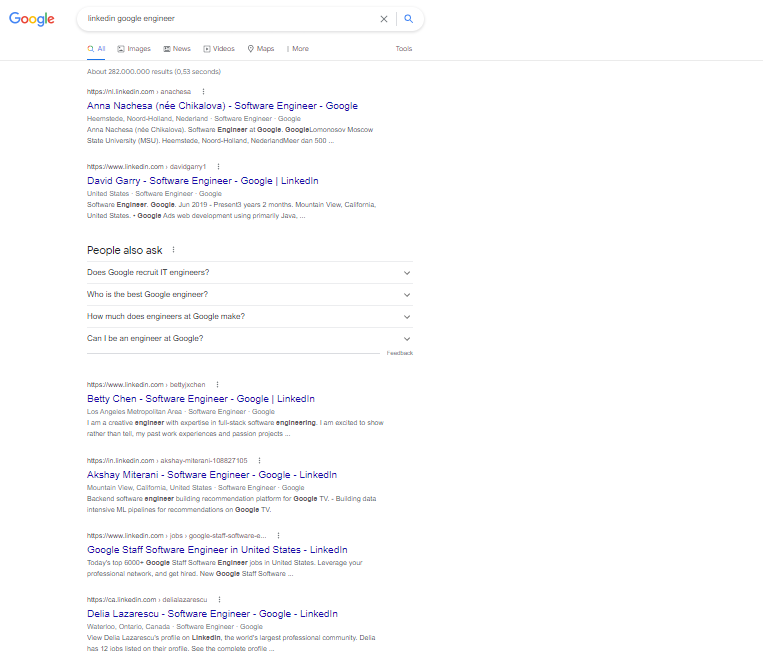
This approach has problems:
- Google may block automated scraping
- search results change by location and time
- result pages are not stable
- LinkedIn pages often require login
- scraping LinkedIn profiles can violate platform rules
- personal data collection can become privacy-sensitive
Because of these issues, we should avoid scraping Google and LinkedIn pages for people data.
If you need search results, use official APIs or approved services. If you need LinkedIn data, use allowed LinkedIn products and follow their terms.
Why Use GitHub API?
GitHub is useful for this project because developer profiles are often intentionally public. Many developers choose to show:
- name
- username
- bio
- company
- location
- blog or portfolio
- Twitter/X username
- follower count
- public repositories
GitHub also provides an official API, which is better than scraping HTML pages.
The GitHub Search page looks like this:
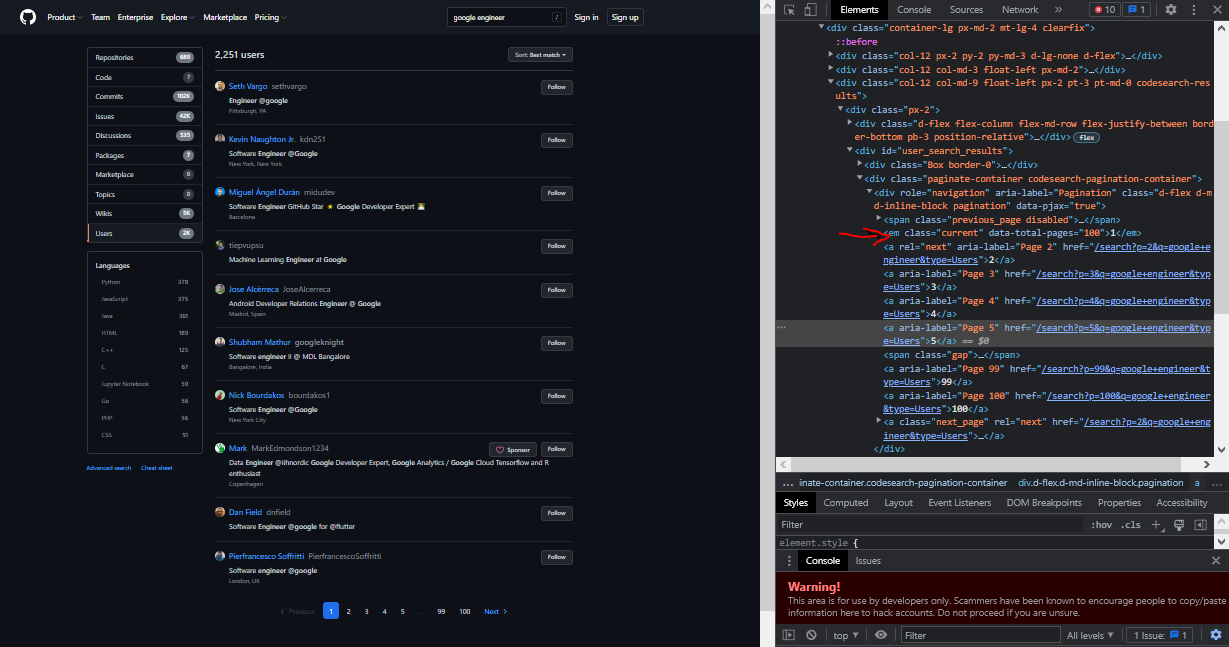
Instead of scraping this HTML page, we will use the API.
Install Dependencies
We will use:
pip install requests pandas python-dotenv matplotlib seaborn
These packages are used for:
requests: calling APIspandas: tabular data handlingpython-dotenv: loading environment variablesmatplotlibandseaborn: plotting
Import Libraries
import os
import time

import pandas as pd
import requests
from dotenv import load_dotenv
For plotting:
import matplotlib.pyplot as plt
import seaborn as sns
Use Environment Variables for GitHub Token
GitHub allows unauthenticated API requests, but rate limits are lower. For better reliability, use a GitHub personal access token.
Create a .env file:
GITHUB_TOKEN=your_github_token_here
Add .env to .gitignore:
.env
__pycache__/
*.pyc
Load the token in Python:
load_dotenv()

GITHUB_TOKEN = os.getenv("GITHUB_TOKEN")
Create headers:
headers = {
    "Accept": "application/vnd.github+json",
}

if GITHUB_TOKEN:
    headers["Authorization"] = f"Bearer {GITHUB_TOKEN}"
Do not hardcode tokens inside code.
Search GitHub Users
GitHub has a search endpoint for users.
The query can include keywords and qualifiers.
Example query:
google engineer type:user
A better query can include location or language-related terms:
machine learning location:Germany type:user
Let’s write a function.
def search_github_users(query, page=1, per_page=10, headers=None):
    """Search public GitHub users."""
    url = "https://api.github.com/search/users"

    params = {
        "q": query,
        "page": page,
        "per_page": per_page
    }

    response = requests.get(
        url,
        params=params,
        headers=headers,
        timeout=30
    )

    response.raise_for_status()

    return response.json()
Use it:
query = "google engineer type:user"

result = search_github_users(
    query=query,
    page=1,
    per_page=10,
    headers=headers
)

result.keys()
The response contains items such as usernames and profile URLs.
Get Basic Search Results
items = result["items"]

for item in items:
    print(item["login"], item["html_url"])
The search result usually includes:
loginidhtml_urlavatar_urltypescore
But it does not include all profile details. For more details, we need another API call.
Fetch Public User Profile Details
Use the user endpoint:
def get_github_user_profile(username, headers=None):
    """Fetch public GitHub profile details for one user."""
    url = f"https://api.github.com/users/{username}"

    response = requests.get(
        url,
        headers=headers,
        timeout=30
    )

    response.raise_for_status()

    return response.json()
Test it:
profile = get_github_user_profile("octocat", headers=headers)

profile
The profile response can include:
loginnamehtml_urlcompanybloglocationbiotwitter_usernamepublic_reposfollowersfollowingcreated_at
Build the Developer Profile Finder
Now let’s combine search and profile fetching.
def collect_github_profiles(query, max_pages=2, per_page=10, delay=1.0):
    """Collect public GitHub profile details from search results."""
    profiles = []

    seen_users = set()

    for page in range(1, max_pages + 1):
        print(f"Searching page {page}")

        search_result = search_github_users(
            query=query,
            page=page,
            per_page=per_page,
            headers=headers
        )

        users = search_result.get("items", [])

        if not users:
            break

        for user in users:
            username = user["login"]

            if username in seen_users:
                continue

            seen_users.add(username)

            try:
                profile = get_github_user_profile(
                    username,
                    headers=headers
                )

                profiles.append({
                    "username": profile.get("login"),
                    "name": profile.get("name"),
                    "url": profile.get("html_url"),
                    "bio": profile.get("bio"),
                    "company": profile.get("company"),
                    "location": profile.get("location"),
                    "portfolio": profile.get("blog"),
                    "twitter": profile.get("twitter_username"),
                    "public_repos": profile.get("public_repos"),
                    "followers": profile.get("followers"),
                    "following": profile.get("following"),
                    "created_at": profile.get("created_at"),
                })

                print(f"Collected: {username}")

                time.sleep(delay)

            except requests.HTTPError as error:
                print(f"HTTP error for {username}: {error}")

            except Exception as error:
                print(f"Error for {username}: {error}")

    return profiles
Run it:
query = "google engineer type:user"

profiles = collect_github_profiles(
    query=query,
    max_pages=5,
    per_page=10,
    delay=1.0
)
The delay helps avoid sending too many requests too quickly.
Convert Results to a DataFrame
df = pd.DataFrame(profiles)

df.head()
This gives a clean table with public profile information.
Example columns:
username
name
url
bio
company
location
portfolio
twitter
public_repos
followers
following
created_at
This is much cleaner than scraping profile HTML.
Save Results to CSV
df.to_csv("github_profiles.csv", index=False)
Later, read it again:
df = pd.read_csv("github_profiles.csv")
Clean Profile Data
Some fields may be missing. We can fill missing values.
df["company"] = df["company"].fillna("")
df["location"] = df["location"].fillna("")
df["portfolio"] = df["portfolio"].fillna("")
df["twitter"] = df["twitter"].fillna("")
Make sure numeric fields are numeric.
numeric_columns = ["public_repos", "followers", "following"]

for column in numeric_columns:
    df[column] = pd.to_numeric(df[column], errors="coerce").fillna(0)
Plot Followers
In the original version, we plotted GitHub followers using Seaborn.
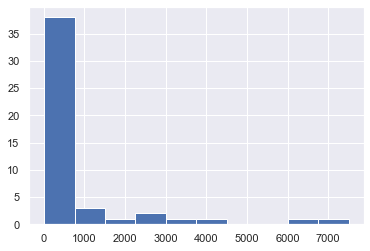
We can do it like this:
import seaborn as sns
import matplotlib.pyplot as plt

sns.set_theme()

df["followers"].hist()

plt.xlabel("Followers")
plt.ylabel("Number of profiles")
plt.title("Distribution of GitHub Followers")
plt.show()
In many GitHub search results, most users have a low follower count and a few users have many followers.
Sort by Followers
top_followed = df.sort_values(
    by="followers",
    ascending=False
)

top_followed[
    ["username", "name", "url", "followers", "public_repos", "location"]
].head(10)
This can help identify highly visible public profiles.
Filter by Location
germany_profiles = df[
    df["location"].str.contains("Germany", case=False, na=False)
]

germany_profiles.head()
This only works if users have added location information to their public profile.
Filter by Company or Bio
google_profiles = df[
    df["company"].str.contains("google", case=False, na=False)
    | df["bio"].str.contains("google", case=False, na=False)
]

google_profiles.head()
This is useful for simple analysis, but remember that profile data is self-reported and may be outdated.
BeautifulSoup Version: Why It Is Fragile
The original version used BeautifulSoup to parse GitHub HTML pages.
Example idea:
from bs4 import BeautifulSoup
import requests

url = "https://github.com/search?q=google+engineer&type=users"

response = requests.get(url)

soup = BeautifulSoup(response.content, "html.parser")
Then it searched for specific CSS classes.
This is fragile because:
- HTML classes can change anytime
- GitHub may block automated scraping
- pages may render differently
- rate limiting and bot detection can happen
- the API is cleaner and more stable
So, BeautifulSoup is useful for learning HTML parsing, but for GitHub data, the API is the better choice.
If You Still Use BeautifulSoup
If you use BeautifulSoup for learning, follow these rules:
- check the website’s terms of service
- check
robots.txtwhere applicable - do not scrape private or login-only pages
- do not send too many requests
- add delays between requests
- identify your user agent honestly where appropriate
- collect only what you need
- do not collect sensitive personal data
- avoid contact harvesting
A minimal example for parsing a normal public HTML page:
from bs4 import BeautifulSoup

html = """
<html>
  <body>
    <a href="https://example.com/profile">Profile</a>
  </body>
</html>
"""

soup = BeautifulSoup(html, "html.parser")

links = [a.get("href") for a in soup.find_all("a")]

print(links)
This teaches the concept without scraping real people at scale.
Rate Limits
APIs have rate limits. GitHub has different rate limits for different API resources, and search endpoints have their own limits.
A good habit is to check rate limit status.
def check_rate_limit(headers=None):
    url = "https://api.github.com/rate_limit"

    response = requests.get(url, headers=headers, timeout=30)
    response.raise_for_status()

    return response.json()
Use it:
rate_limit = check_rate_limit(headers=headers)

rate_limit["resources"]["search"]
If you get rate limited, slow down and wait before making more requests.
Common Problems and Fixes
Problem 1: 403 Rate Limit Error
You may be sending too many requests.
Fixes:
- use authentication
- reduce
per_page - reduce
max_pages - add delay between requests
- check
/rate_limit - cache results locally
Problem 2: Empty Results
Your query may be too narrow.
Try:
machine learning type:user
or:
python developer location:Germany type:user
Problem 3: Missing Portfolio or Twitter
Not every GitHub user fills all fields.
This is normal.
Problem 4: Duplicate Profiles
Use a seen_users set.
seen_users = set()
Problem 5: Data Is Outdated
GitHub profile data is user-managed. It may be incomplete or outdated.
Do not assume it is fully accurate.
Privacy and Data Minimization
Even when using public data, collect only what you need.
For example, for a learning project, this is enough:
- username
- GitHub URL
- public bio
- public portfolio link
- public repository count
- public followers count
Avoid collecting:
- emails
- phone numbers
- private contact details
- personal social data not needed for the project
- anything behind login or access controls
Better Project Ideas
Instead of building a “people finder” for outreach, you can build safer tools such as:
- open-source contributor discovery dashboard
- GitHub topic explorer
- public repository analyzer
- developer portfolio search for your own learning
- GitHub profile statistics dashboard
- open-source community map
- public project recommendation tool
These are useful and less privacy-invasive.
Full Example
Here is a complete minimal version.
import os
import time

import pandas as pd
import requests
from dotenv import load_dotenv


load_dotenv()

GITHUB_TOKEN = os.getenv("GITHUB_TOKEN")

headers = {
    "Accept": "application/vnd.github+json",
}

if GITHUB_TOKEN:
    headers["Authorization"] = f"Bearer {GITHUB_TOKEN}"


def search_github_users(query, page=1, per_page=10):
    url = "https://api.github.com/search/users"

    params = {
        "q": query,
        "page": page,
        "per_page": per_page
    }

    response = requests.get(
        url,
        params=params,
        headers=headers,
        timeout=30
    )

    response.raise_for_status()

    return response.json()


def get_github_user_profile(username):
    url = f"https://api.github.com/users/{username}"

    response = requests.get(
        url,
        headers=headers,
        timeout=30
    )

    response.raise_for_status()

    return response.json()


def collect_github_profiles(query, max_pages=2, per_page=10, delay=1.0):
    profiles = []
    seen_users = set()

    for page in range(1, max_pages + 1):
        search_result = search_github_users(
            query=query,
            page=page,
            per_page=per_page
        )

        for item in search_result.get("items", []):
            username = item["login"]

            if username in seen_users:
                continue

            seen_users.add(username)

            profile = get_github_user_profile(username)

            profiles.append({
                "username": profile.get("login"),
                "name": profile.get("name"),
                "url": profile.get("html_url"),
                "bio": profile.get("bio"),
                "company": profile.get("company"),
                "location": profile.get("location"),
                "portfolio": profile.get("blog"),
                "twitter": profile.get("twitter_username"),
                "public_repos": profile.get("public_repos"),
                "followers": profile.get("followers"),
                "following": profile.get("following"),
                "created_at": profile.get("created_at"),
            })

            time.sleep(delay)

    return pd.DataFrame(profiles)


if __name__ == "__main__":
    query = "python developer location:Germany type:user"

    df = collect_github_profiles(
        query=query,
        max_pages=3,
        per_page=10,
        delay=1.0
    )

    df.to_csv("github_profiles.csv", index=False)

    print(df.head())
    print(df.shape)
Final Thoughts
In this post, we built a safer version of a public developer profile finder in Python. The original version used BeautifulSoup to scrape Google and GitHub pages, but the updated version uses the GitHub API, which is cleaner, more stable, and easier to maintain.
The most important lesson is not just technical. It is also ethical:
Collect only public data, use official APIs when possible, respect rate limits, and avoid turning scraping projects into privacy-invasive tools.
This project is useful for learning APIs, pandas, public data analysis, and basic automation. It can also be extended into a GitHub profile analytics dashboard or open-source contributor discovery tool.


Comments